About

Blogger WidgetsRecent Posts Widget for Blogger

Link list 4

Link list 2

Link list 3

Popular Posts

Followers

Link list 1

Banner 468


Recommend on Google

Tags

Popular Posts

Showing posts with label Cydia. Show all posts

iPhone, iPad, iPod TIPS!


Removing album artwork from the iPhone lockscreen when playing music
AND
Conserving iPhone data usage!


FIRST starting with the album artwork.


These steps will show you how to do this on a Windows-based machine, but there are similar SSH tools for Mac users as well.
First, download WinSCP and make sure you have OpenSSH installed on your jailbroken iPhone.
Your device should be connected to the same WiFi network as your PC for SSH purposes.

Now follow these steps.


  1. Make sure SSH is turned ON from your iDevice, you can turn it On or Off via SBSettings toggle if installed.
  2. Start WinSCP. While loading it, you'll be asked to input the IP address, login and password for the device you're attempting to SSH into. To find the IP address of your iPhone, go into the settings app under WiFi and select the network you're connected to. The default login/password will be root/alpine unless you've changed it manually!
  3. Once you've successfully SSH'd into the device, navigate to /System/Library/SpringBoardPlugins and locate the folder titles NowPlayingArtLockscreen.bundle. Rename this folder to NowPlayingArtLockscreen.bundle.backup   
  4. Respring your iDevice to see the changes take effect.

That's it! No more seeing album art displayed on the lockscreen when music or podcasts are playing!

P.S.: To cut out the need for a PC or Mac install iFile on your iPhone or iPod Touch. It will allow you to navigate the iOS file system and make changes to files or folders, among other things. To make changes using iFile, just launch the app and navigate to the path mentioned in the third step to make the appropriate changes to the required folder.
iFile is available in the Cydia Store.


SECOND Conserving your iPhone Data Usage.


If you have a limited 3G data on your iPhone or iPad, and you're getting a message that you've used most of your data for the month and you still got weeks before the next billing cycle. Overage charges are one of the most expensive items a carrier can bill you!

The first thing you need to do is to track how much data you are actually consuming, surely the carrier is the only 100% accurate thing at tracking, but if you wanna know a general idea you can use the iPhone's built-in data usage monitor.

To check your data usage do this:

  • Launch Settings
  • Tap General
  • Tap Usage
  • Scroll down to Cellular Network Data
If you use Tether Data, make sure to include that in your calculation.
Set an alarm to remind you to tap Reset Statistics at the beginning of each billing cycle so you have a better idea how much data you're using during the current month.

The media streaming, like videos, are the biggest consumers of cellular data, so you better wait until you're on WiFi to feed it.
These are other stuff which you better avoid:
  • Anything that streams.
  • Online gaming, graphics are costing you data!
  • Google Maps
  • App Store, even though apps are capped at 20MB for cellular data, but start downloading a bunch of 20MB apps and you'll feel the pain!

Once you've got streaming under control, conserving data becomes pretty much about how to turn off setting or shut downs apps which uses data like the ones running in the background.
  • Turn off push email and switch to fetching email in manual mode. Go to Settings:Mail, Contacts, Calendar:Fetch New Data and set it to Manually.

  • Turn Off push notifications. Go to Settings: Notifications and set them to off.

  • Turn Off Cellular Data unless you really need it, this will prevent anything from running in the background. Go to Settings:Cellular Data and turn it Off.

SMS/Texting doesn't use data, but MMS and Visual Voice Mail use data to transmit pictures, videos and audio, so never use them if you're close to your limit!


Finally, you better upgrade your data to a bigger data plan. If you're constantly getting billed for extra data every month, so be realistic and upgrade it!


by tipb

Save Facebook Photos to iPhone with Official Facebook App for iPhone [Jailbreak Tweak]

One of the features you may seek about it on the official Facebook app is how to save Facebook photos on your iPhone camera roll. Now we got it, FBPhotoSave is a new Cydia tweak which allows you to save photos from Facebook app directly to your camera roll.


How to use FBPhotoSave? simply tap and hold the picture you want to save until it prompts from you to save it as  shown on the above screen-shots.

FBPhotoSave is now available via Cydia under ModMyi repo for $0.99

iPhone 4 jailbroken to run on China Telecom Network.


Employees of Chinese carrier China Telecom have successfully jailbroken and unblocked the CDMA iPhone 4, letting the device work on the company's network!


Employees of the Guangdong branch of China Telecom teased users this week with a post on its microblog saying they were working on a way to crack Verizon Wireless' CDMA iPhone, suggesting users might be able to use the device on China Telecom's network.


A post signed the "Apple Lab Team" on the Sina Weibo account identified as belonging to the Guangdong branch of China Telecom said Tuesday the "CDMA iPhone 4 has made its first call in China" without a hitch.
Preceding posts included a photo of a Verizon Wireless iPhone beside a tag labeled China Telecom Guangdong, then a photo of the device displaying the home screen for Cydia, a software application that allows users to find the applications and software packages for jailbroken Apple devices.
Reported the Wall Street Journal.


China Telecom had talks with Apple to offer the CDMA iPhone 4 and a new report, where Brian White says there will be a deal coming sometime this year.
The key takeaway is that the relationship between Apple and China Telecom is clearly moving in the right direction, and we believe that a deal will eventually be announced this year.


China Telecom has now 90.5 million subscribers, which is slightly behind Verizon and AT&T in terms of total subscriber base.

BEST ( tweaks ) from Cydia 2011!! (VIDEO)

Today I will be going through some of the best apps from Cydia, to get Cydia you have to be jailbroken, there plenty of video that how to jailbreak, and one more thing these apps won't work for all iOS devices, you check the compatibility while you are on Cydia. SOURCE:
sinfuliphonerepo.com & repo.hackyouriphone.org (make sure that you type it correctly) Cydia apps: * lockinfo ( $7.99 but you will be getting a trail for like two weeks ) * multicleaner ( free ) * folderenhancer ( trail for like 1-2 weeks, get the cracked one and there will be some instruction telling you how to get the full one for free after the trail finishes) * barrel ( free, cracked ) *winterboard ( free ) * nexus s live wallpaper ( free ) * graviboard ( free, cracked ) Get these cool apps as well: sleepFX, SBsettings, instalouse !


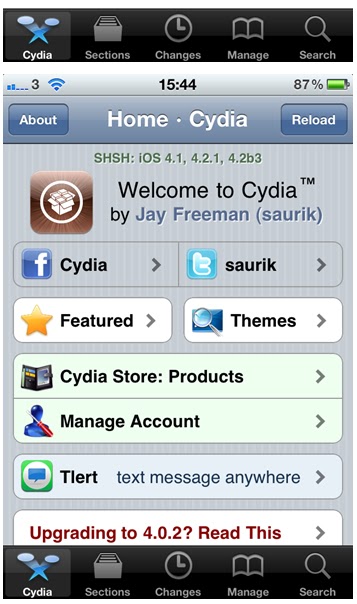
Cydia is inaccessible on 3G Networks!


3 Ireland (iPhone carrier) has blocked Cydia's server from their network!
As well as UK and Unicom China!!


One of Redmond Pie's readers, living in the UK and having an iPhone 4 on three, noticed that the third network blocks many websites.
And now, they are blocking Cydia! Though the site works fine on WiFi!


This picture shows the effect of "3G"!


And that's the effect of WiFi!


iPhone Voice Controlling EVERYTHING!! (Video)


A new tweak is to be released in Cydia soon. It will give more power to your Voice Control by opening apps, launch URLs and perform any activator action, like taking a screenshot!!


VoiceActivator will have a settings panel where you can create the voice shortcuts and have them recognized by iOS' built-in support for voice command.
Let's say you want to open MacStories in a new Safari page, assign "macstories" to a new action in VoiceActivator. Then speak it and Safari will launch..JUST LIKE THAT!
Kind of fancy to show off to your friends!


Check the Video below!


Courtesy macstories.net


Themes for jailbroken iPhones!


A new feature, Theme center, was released which allows users to search for popular themes!
Now "Theme It" is available as a Cydia package for jailbroken iOS device. It comes with some themes and it's easy to be used!


1st Step:

You have to jailbreak your iOS 4.2.1 device using Redsn0w.


2nd Step:

Open Cydia and choose Manage then Source, edit and add the following link (as shown below).
http://www.themeitapp.com/repo


3rd Step:
Go back and install the 'Theme It' app.


4th Step:
You'll get 'Theme It' on your home screen, launch it and enjoy!

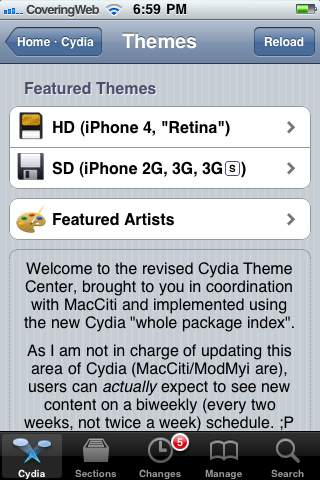
Theme Center - Cydia New Feature

Saurik -the Cydia creator- has opened a new center in Cydia called Theme Center. This new feature will allow you to search for Retina and non-Retina themes. At this moment it contains only some popular themes, MacCiti and ModMyi staff picks.


The second feature to use my Whole Package Index, the “Cydia Theme Center”, went up an hour ago, and 15,000 people have already tried it! ;P
This is the second feature Jay Freeman adds to Cydia, the first one allows users to easily check installed packages. As noted by saurik this new feature looks pretty good and popular. [viaAppAdvice]

Add Your Themes in One Place with Theme It [Jailbreak]

Theme It, a new jailbreak tweak will be available via Cydia soon. This tweak would put your themes in one place instead of Winterboard and as the official site reports, it will be available for all jailbreak users soon as a Cydia package.

What makes Theme It unique, it allows you to separate all these available themes out into their own dedicated “platform”. It will be similar to Cydia store but will feature themes only.

Check out the embedded video below and what the developers say:


A carefully designed platform (application and website) allowing focus on high-quality themes and also the artists behind the themes in a way that wasn’t possible before… it’s the Theme Store you’ve been dreaming of using.

With some of the best theme creators already on-board we can guarantee you’ll have access to amazing and exclusive content in an environment that’s sure to meet everyone’s needs. Focusing on high-quality, complete themes, the goal of Theme it isn’t to have a million themes in the gallery… but the best ones available.

The platform includes a very user-friendly website and an iPhone/iTouch application to showcase and distribute the themes with instant access to the information you really want, such as screenshots, details, compatibility and much more. You’ll also have the opportunity to learn a little more about the artists that create the themes you love and use. A section will be dedicated to these wonderful designers.
Stay tuned for the release soon! (iClarified)

HackCenter Will Hack Games on Game Center

This will be an amazing hack for all Game Center users, this hack will allow you to send any score you want to any game in Game Center, this hack called "Hack Center", it will be available at Cydia soon, in the below embedded video you will see how to use HackCenter to submit a fake score for "Fruit Ninja".


[via 9to5mac]

FakeClockUp Speed Up Your iPhone and iPod Touch [Jailbreak Tweak]

FakeClockUp is a new amazing Cydia tweak to speed up your iPhone or iPod touch animations. FakeClockUp will allow you to accelerate your device animation up to 10 times. The tweak is available for free. Check how to install it and see it in action on the below embedded video.


 Install the FakeClockUp tweak
  • Add this to your Cydia sources: http://hitoriblog.com/apt/
  • Install the package named FakeClockUp.

Use your iOS Device While It's Syncing with FreeSync !

Ever get annoyed of those long sync times when you plug your iOS device to iTunes as it backs up or when you're syncing a lot of media? Don't you want to use your device while it's syncing? If you do, this the tweak just for you! FreeSync is a tweak in Cydia released today that allows you to use your iOS device during Sync times.


FreeSync is a gret feature for anyone that needs to wait for their devices to finish. With FreeSync, you can now play a game on your device while it's syncing! If you're a multitasker and you're in a hurry, you can check your email and do whatever you need to do while it syncs.

What's so great about FreeSync? FreeSync provides a toggle in the Settings app and it also notifies you when it starts syncing. Once it ends the sync, it notifies you that it is finished.

FreeSync is available for $1.00 in the ModMyi Repo.

Easily Rename your iPhone App Icons with Icon Renamer [Jailbreak Tweak]

Icon Renamer is a new Cydia tweak that allows you to easily rename your iPhone app icons directly from Springboard. The tweak developed by Cydia developer Ryan Petrich and it's totally free.

Once installed, simply tap and hold to enter jiggle mode, then tap the icon you want to rename as shown in the screenshot below. What I like in this tweak that it doesn't install a new app in your Springboard or place an icon in the settings app.

Icon Renamer can be found in Cydia via BigBoss repository for free. Also check our Cydia tweaks gallery for more must-have and useful Cydia tweaks that enable functions Apple has missed ! That's why we do a jailbreak !

RetinaPad Enables Retina Display for iPhone Apps on iPad [Jailbreak Tweak]

This is a very handy tweak for iPad users since the iPad can run iPhone apps in compatibility mode but when an iPhone app is blown up to 2x mode, the graphics become fuzzy. Even the app's got Retina-Display-ready graphics on iPhone, it'll still pix-elated on the iPad.


However, RetinaPad fixes this problem and it works awesome on any app that's got Retina-Display-ready graphics. You need a jailbroken device so you can access Cydia and install it. Once installed, launch your iPhone app and tap on 2x then you'll really notice that the app looks clean. Check the below screenshot, it works great on Facebook for iPhone app and most of the iPhone apps:
RetinaPad is available in Cydia Store at $2.99 via BigBoss repository. You can use Redsn0w to jailbreak iOS 4.2.1 on iPad. [Thanks @High_dB]

Cydia Now Saving iOS 4.2.1 SHSH Blobs for Untethered Jailbreak Today ! Get Ready !

Earlier today, Cydia started saving SHSH blobs of iOS 4.2.1 on new-generation devices only since I couldn't see the SHSH blobs on my iPhone 3G but it's been saved on iPhone 4. This happens because you'll get the untethered jailbreak after few hours !


This may be useful to get the untethered jailbreak. To save SHSH blobs of iOS 4.2.1, just tap on Cydia from your new-generation iOS device and hit on the Make my life easier button to save your blobs immediately.

For those who don't know, the iPhone Dev Team will release untethered Redsn0w 0.9.6b7 jailbreak for iOS 4.2.1 or what's known by the backup plan today. We'll of course be posting this as soon as it's available for download and will be back with full how-to guides quickly. Stay tuned !

[Thanks @High_dB for hat tip via Twitter]

Pull to Refresh Safari Makes Refreshing the Web Easier !

Apple has missed this feature too! Pull to Refresh Safari is the latest jailbreak tweak that adds pull to refresh feature from Twitter app for iPhone. It was just few days ago when Pull to Refresh Mail released which added the same unique refreshing capability to the stock Mail app.


Once you download the tweak, tap to Safari and slide the page down till you see the refresh message. Now release your finger and the page will automatically be refreshed, just the same as you touch the refresh button.
Pull to Refresh Safari is available in Cydia for free under BigBoss repoistory ! Go get it while it's hot !

WeBe++ Transforms your iPhone into a Bluetooth Keyboard for your Computer [Jailbreak App]

WeBe++ is a new jailbreak app available in Cydia store that emulates a Bluetooth HID mouse & keyboard. It provides all the functions of a real Bluetooth mouse and keyboard in your pocket! You can use it with your PS3 / Mac / PC!


To use WeBee, you'll need to jailbreak your device, follow our guide posted here to jailbreak your iOS 4.2.1 device using Redsn0w or use Limera1n iOS 4.1 jailbreak. Once jailbroken, tap on Cydia and search for WeBee++ under Cydia store and install it.
Once you install the app, you can follow the instructions to use it as shown on the official site of the app:
Start up WeBe++ and press the “Start WeBe++” button. Now WeBe++ activates the open-source Bluetooth Stack (btstack.org) and you can activate the device discovery on your Mac/PC/PS3 to pair with your iOS device.

After the successful pairing, the complete screen of your iOS device serves as a trackpad. On the trackpad, you will see two icons: the keyboard icon and an icon to disconnect. Press the keyboard icon to show and hide the on-screen keyboard. The trackpad supports single and double taps, while two finger swipes are sent as vertical and horizontal panning gestures. A double finger tap serves as right mouse click. See the Help section in the main view for more details.

RetinaAppIcons Converts Your Springboard Icons Automatically to Retina Display!

RetinaAppIcons is a jailbreak tweak that promises to converts all of low resolution app store icons to a high resolution retina ones for a nominal fee of $0.99 cents only.


Features:
- Works with 99.9% of all AppStore Apps
- Automatically generates high-quality App Icons
- For iPhone 4 / iPod Touch with Retina Display
- For iPad Screen
- For all the different sized Icons (Spotlight Search,…)
- Works automatically in background without user interaction
- Updates Icons on Respring or after installing new App
Once you install this tweak and give your device a respring, all of your existing App Store Apps that lack retina compatible icons will automatically be converted the same like below:
You can purchase RetinaAppIcons for $0.99 from Cydia Store via BigBoss repo. Let us know how do you like it in the comments section below. Also don't forget to check our Cydia apps gallery for more jailbreak apps and tweaks.

Have You Ever Thought Why Cydia is Called Cydia?

Anyone with a jailbroken device has Cydia on their devices and most of you know that Jay Freeman (a.k.a. saurik) is the one behind Cydia but have you ever though why Cydia is called Cydia? What does this word mean?


Cydia is actually named after a moth. The Cydia pomonella is the scientific name for the “coddling moth,” or what is more commonly known as the stereotypical Apple worm.

This Wikipedia article claims that the Cydia pomonella has proved to be a problematic pest on several fruit trees, including apples and pears. The caterpillars burrow into the fruit, rendering it un-sellable. Cydia has become very popular for the iOS world as almost every iOS device uses the term jailbreak and install Cydia.

So, Cydia is named after a moth that's a pest for fruit trees as those of Apple trees. Yeah, that's the real mystery behind Cydia and if anyone says Cydia a different way, you are free to correct them. [via iDB]

SBSwitcher Puts SBSettings Toggles in the App Switcher (Multitasking Bar)

SBSwitcher is a new tweak available in the Cydia store. It allows you to place SBSettings toggles in the App Switcher (i.e. the multitasking bar). Simply scroll the App Switcher bar to the left to access SBSettings toggles. This tweak is compatible with iOS 4.x on iPhone and iPod touch.


SBSwitcher can be purchased in Cydia store for $2.99 via BigBoss repository and you can configure it from the Settings app on your SpringBoard. Let us know in the comment section below.